


 previous section previous section |  contents contents | next section  |
6 The Store
The Store is an interface that is accessible directly from within Proots OT. It offers players a very convenient way to buy a wide range of Proots OT products for Proots OT Coins without having to leave the game. What is more, most offered products like Mounts, a Character Name Change, a Transportation Service or Premium Time are available right away after the purchase. No relog necessary.6.1 Proots OT Coins 
Proots OT Coins are a special currency in Proots OT, which you can buy in the Webshop. They are available in packages of different sizes and can be used to buy character-based Extra Services, Mounts, Outfits, Blessings, XP Boosts, House Equipment, Runes, Potions & Kegs, Premium Time and other Useful Things. Proots OT Coins are available to all characters on an account. Once bought, they are automatically assigned to the account and immediately available ingame.Proots OT Coins can be gifted to other characters, even on other game worlds. They can also be traded via the Market. Both Premium and free account players can place buy and sell offers to trade Proots OT Coins.
However, depending on the selected payment method, the amount of Proots OT Coins you want to order, and certain account criteria, it is possible that you can only purchase Proots OT Coins which cannot be gifted or traded within the first 6 months after the purchase.
6.2 Store Interface
The Store can be entered via the Store button beneath the inventory.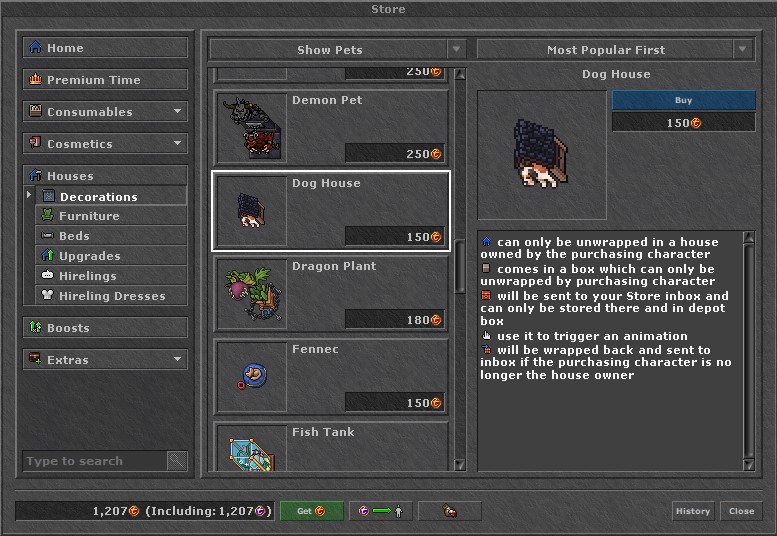
Categories:
In the first column, the various categories are displayed in which the different Store products are sorted: Home, Premium Time, Consumables, Cosmetics, Boosts and Extras. Some categories have subcategories which can be opened by clicking on the little arrow right of the category title. In the Home section, you will find recently added and featured products. If you select one of these categories or subcategories, all products belonging to it are displayed in the second column.
If you know which product you are looking for, you can also use the search function at the bottom of the first column.
Products:
In the second column, all products of a (sub)category are listed. Some of these (sub)categories are further divided in various groups. On top of this column, players can choose if all products of the selected (sub)category are shown or if only a certain group of this (sub)category is shown.
Products which are greyed out are not available for the purchasing character. Either, with the purchase you would exceed the maximum amount of the selected product a character can own or you do not fulfil the requirements for the purchase (e.g. you cannot purchase potions if you do not have enough capacity).
If you select a product, it will appear in the third column.
Selected Product:
On top of the third column, players have further ways to sort the products shown in the second column. "Most popular first" is pre-selected. Finally, in the third column, the selected product is displayed. You find a picture of the product, the price and important information about it. Click on "Buy" to purchase the product. A dialog will open up in which you are asked to confirm the purchase. Note that you will buy a product instantly without any confirmation if you have previously disabled this confirmation dialog. You can do so either in the dialog itself or under Options -> Misc. Click on the red treasure box to complete the purchase.
Products which are available in different quantities will have 2 different "Buy" buttons which is followed by the amount you will purchase by clicking this button.
Mounts and Outfits all have an additional button "Try On". If you click on it, the outfit dialog will open up, showing the selected mount or outfit. So you will always know what an outfit or mount will look like if you wear or ride it.
Keep in mind that you will purchase a product always for the character with which you are online during the purchase. Of course, Premium Time is valid for the whole account.
Your Current Proots OT Coins Balance:
In the first field at the bottom of the Store dialog, you can see how many Proots OT Coins you currently own on your account. Proots OT Coins are displayed with two different symbols:
 Symbolises all Proots OT Coins on an account
 Symbolises all transferable Proots OT Coins on an account

Clicking on this button will bring you to the Webshop on the Proots OT website where you can purchase Proots OT Coins. For more information, please have a look at the section Ordering Premium Time, Proots OT Coins or Account-Based Extra Services.
Gift Proots OT Coins:

If you click on this symbol, a dialog opens up which allows you to gift transferable Proots OT Coins to characters of other accounts.
First enter the name of the character that should receive the Proots OT Coins. You can enter any character, no matter on which game world he or she lives. Make sure that you have spelled the character name correctly, because there is no way to get Proots OT Coins back that you have gifted to someone else. As Proots OT Coins are valid for the whole account, it is of course not possible to gift Proots OT Coins to characters on your own account. Finally, choose the amount of Proots OT Coins you like to gift. Note that the amount can only be raised in steps of 25. Of course, you cannot gift more Proots OT Coins than you have got on your account. If you are sure you have entered the correct character name and selected the correct amount of Proots OT Coins you like to gift, click on "Okay" to finalise the process. The Proots OT Coins will arrive at the recipient immediately and can be used by all characters of the recipient's account.
Set Up a Character Auction:

Clicking on this button will open up a dialog in which you can set up an auction to sell the character with which you are logged in:
- On the first page, you can check if you fulfil all required conditions to sell this character.
- On the next page you can select the starting price for your character's auction and choose at which day and time your auction should end. Note that your local time is displayed there. Moreover, you can select here some sales arguments which should be displayed for your character.
Show up to 4 of your rarest and most valuable items and up to 5 of your best skills, your greatest achievements or other outstanding features of your character! All items and features you select here will be displayed under Current Auctions in the section Char Bazaar on the Proots OT website. Everything else can only be viewed by checking the details for your character. - Finally on the last page, you can recheck your auction set up. If you have selected everything correctly and you are sure that you want to put up this character for auction, "Confirm" your choice. Go back to a "Previous" page to change your current set up. If you have changed your mind and don't want to sell this character any longer, simply "Cancel" this set up.
History:

In this list you can see all of your Proots OT Coins transactions. All Proots OT Coins that were added to your account are displayed in green, marked with a "plus" in front of it. Proots OT Coins that were subtracted are shown in red, prefixed by a "minus". In the column "description" you can see on what you have spent your Proots OT Coins or where you received them from. If you click on "Details", you will get further information about the single Proots OT Coins sales and purchases you have made.
You can also check your Proots OT Coins History via your account management page on the website.
| previous section | contents | next section |